Intelligent Vibration Monitor
1. Overview
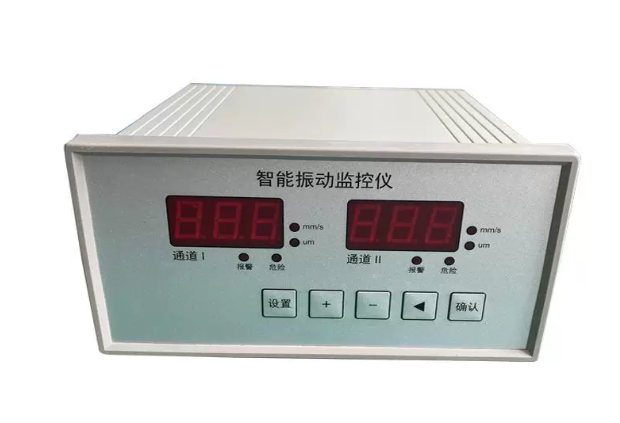
The vibration monitor is mainly used for long-term monitoring of the vibration severity of rotating machinery with a rotational speed of 600~60000 rpm. When matched with magnetoelectric vibration velocity sensors, it can monitor the vertical and horizontal vibration of rotating machinery. The vibration severity value is displayed on the front-panel meter of the instrument. It also provides a standard current output for connection with various DCS and PLC systems. When the vibration value exceeds the limit, the instrument can be connected to an external audible-visual alarm to prompt on-site operators to take preventive measures. Alarm and danger switch outputs are available to ensure safe and reliable operation of the machinery.
2. Function Description
- Intelligent processing: Alarm value I and Alarm value II can be arbitrarily set via the front-panel keys.
- The measuring range can be adjusted via the front-panel keys; no potentiometer adjustment is required for convenient on-site commissioning.
- The instrument automatically returns to the running status if no operation key is pressed for one minute.
- The alarm delay is adjustable from 1 s to 60 s to prevent false alarms caused by on-site interferences.
- Free switching between vibration severity (vibration intensity) and vibration amplitude (vibration displacement). (In the running status, long-press the “Cursor” key to switch the display between vibration severity and vibration amplitude.)
3. Technical Specifications
| Item | Specification |
| Frequency Range | 10~1000 Hz |
| Measuring Range | 0~20.0 mm/s, 0~200 μm; 0~50.0 mm/s, 0~500 μm |
| Accuracy | ±1% of full scale |
| Current Output | 4-20 mA |
| Switch Output | Normally open: DC 30 V / 5 A or AC 250 V / 5 A |
| Alarm Setting | Arbitrary setting within the full-scale range |
| Ambient Temperature | Operation: 0~65 ℃ Storage: -30~80 ℃ |
| Relative Humidity | Up to 95%, non-condensing |
| Power Supply | 220 VAC / 50 Hz ±10%, 50 mA |
| Overall Dimension | 160 × 80 × 160 mm |
| Panel Cut-out Size | 152⁺¹ × 75⁺¹ mm |
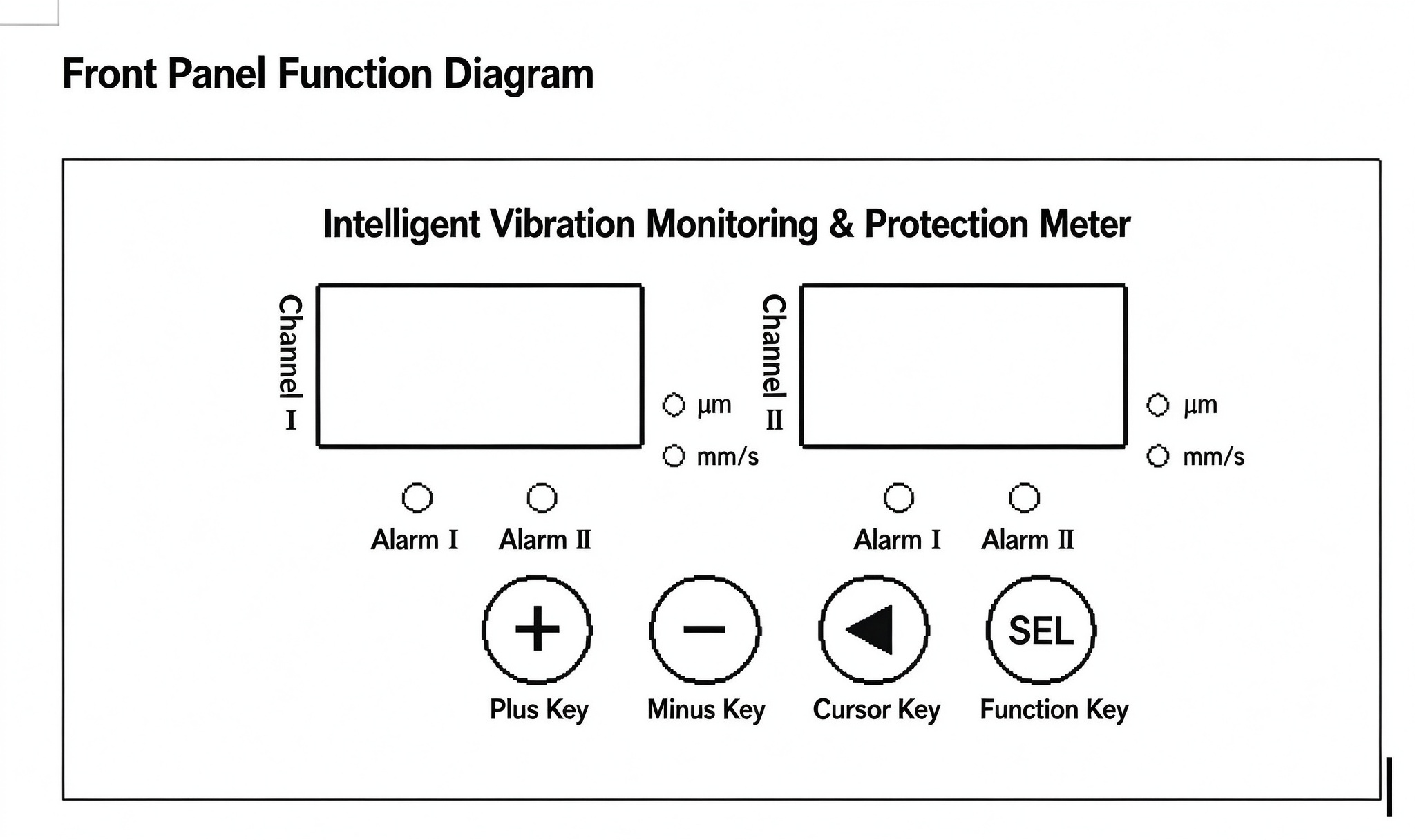
4. Front-panel Functional Diagram
Channel A Display Window: Shows the Channel-I vibration value in the running status; shows the parameter identifier in the parameter-setting status.
Channel B Display Window: Shows the Channel-II vibration value in the running status; shows the parameter value corresponding to the identifier in the parameter-setting status.
Alarm Indicator Lamp: Lights up when the measured value exceeds the set alarm threshold.
“Function” Key: Long-press for 5 seconds to enter the parameter-setting mode. In the parameter-setting mode, press this key to enter the parameter-editing mode. Press this key after editing to confirm the modified parameters. After the parameter setup, long-press for 5 seconds again to return to the running status and save the modified parameters.
“Plus” Key: In the parameter-viewing mode, press to view the next parameter. In the parameter-editing mode, increment the selected digit (range: 0-9).
“Cursor” Left-shift Key: In the parameter-editing mode, shift the editable digit position (e.g. from the units digit to the hundreds digit).
5. Parameter Setting and Operation
The instrument is fully calibrated before delivery and can be used directly. If you need to view or modify the factory parameters, follow the procedures below.
After power-on, the instrument enters the running status and displays the displacement values of each channel on the panel.
All parameters are configured via the “Function”, “Cursor” and “Plus” keys on the panel. Each parameter is represented by an identifier. The setting sequence and steps are as follows:
| Parameter Identifier | Parameter Description | Setting Range |
| E1- | Channel I Alarm Value I | 0~999 |
| P1- | Channel I Alarm Value II | 0~999 |
| L1- | Channel I Measuring Range | 0~999 |
| E2- | Channel II Alarm Value I | 0~999 |
| P2- | Channel II Alarm Value II | 0~999 |
| L2- | Channel II Measuring Range | 0~999 |
| EE- | Alarm Delay | 0~60 s |
| Adr | Communication Address | 1-247 |
| bAU | Baud Rate | 48=4800 bps 96=9600 bps 192=19200 bps 384=38400 bps |
| SE1 | Channel 1 Sensitivity Setting | – |
| SE2 | Channel 2 Sensitivity Setting | – |
Note: In the parameter-setting mode, the Channel-I display window shows the parameter identifier, and the Channel-II display window shows the corresponding parameter value.
Press and hold the “Function” key for about 5 seconds to enter the parameter-setting mode. “E1-” appears in the Channel-I display window, and the factory default Channel-I Alarm Value I “06.3” appears in the Channel-II display window. Press the confirm key to enter the parameter-editing mode; the lowest digit will flash. Use the “Plus” key to increment this digit (0-9). Press the “Cursor” key to make the next higher digit flash, then modify it with the “Plus” key. Repeat this operation: select the digit position with the “Cursor” key and modify the digit with the “Plus” key. Press the “Function” key to complete editing for this parameter. Press the “Plus” key to proceed to the next-parameter setup. Or long-press the “Function” key for about 5 seconds to return to the normal running status.
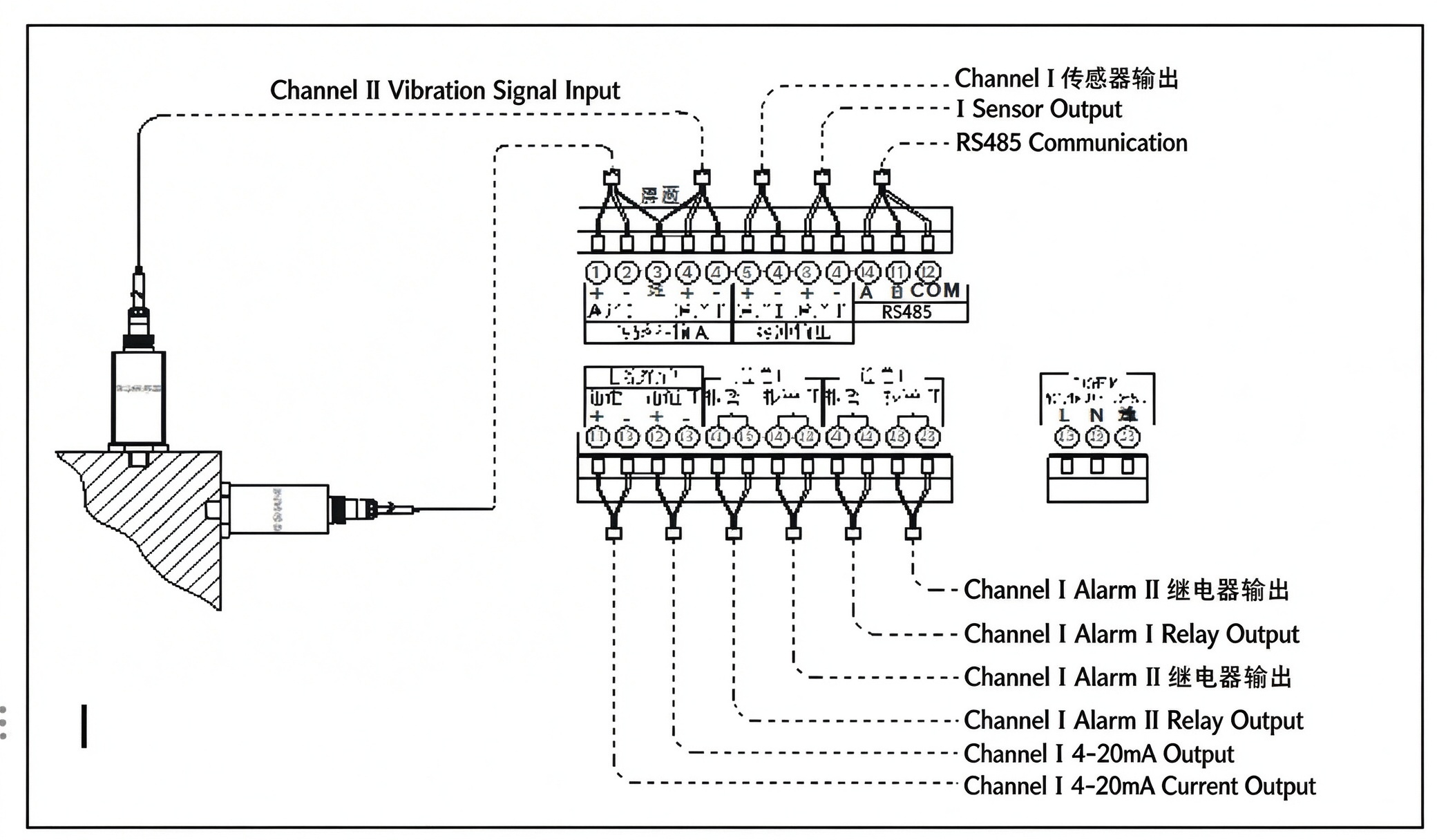
6. Terminal Wiring Diagram and Sensor Installation
7. Commissioning Instructions
The instrument has been calibrated before delivery and is ready for direct user operation.
8. Installation
Install the monitor in the central control room. Insert the monitor from the front side of the control cabinet, attach the left- and right-side mounting brackets (supplied by the manufacturer) from the rear, and tighten the screws. Connect all input and output wires to the terminal block on the rear of the monitor as required.
No tags found.